Listen to this Post
Introduction:
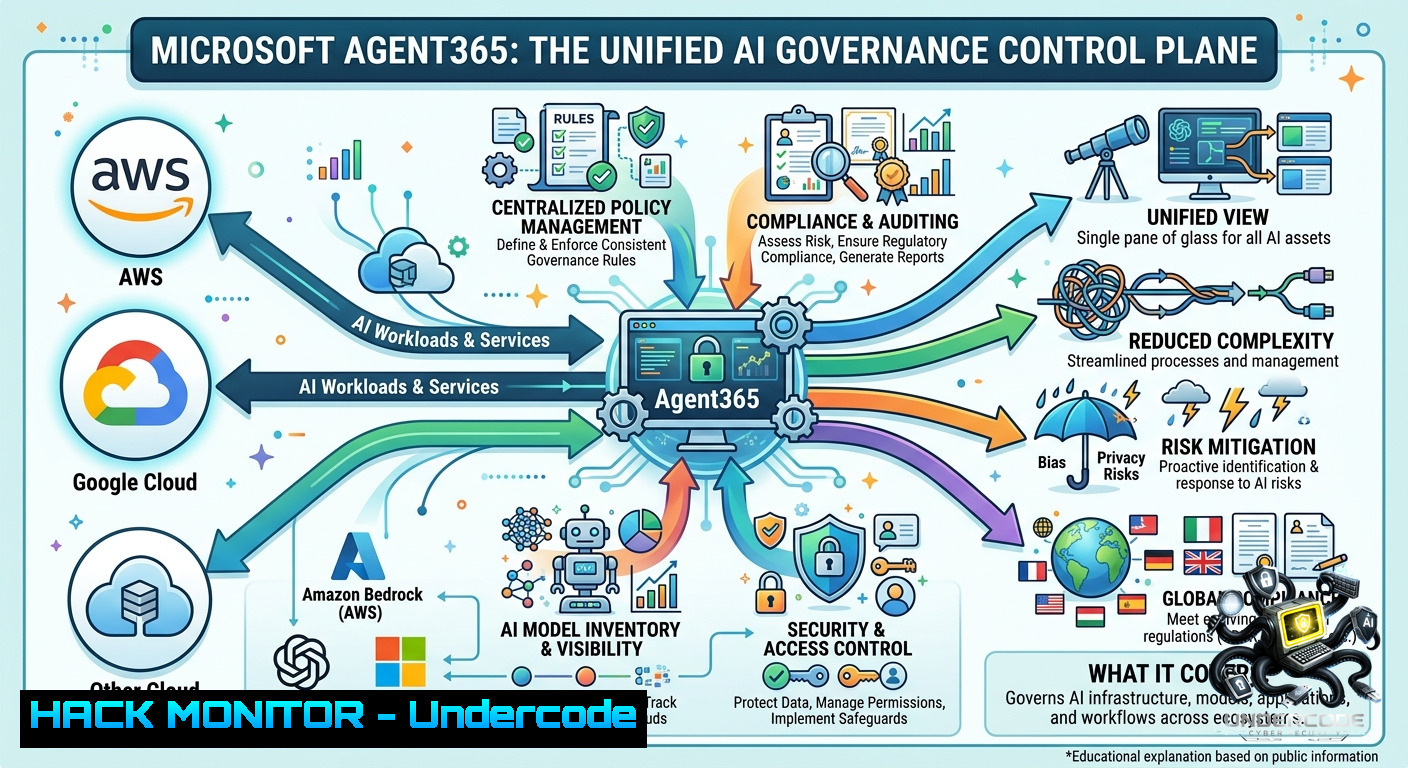
The enterprise is rapidly shifting from standalone chatbots to interconnected AI agents that can act, reason, and collaborate across platforms. Microsoft Agent 365 emerges as a critical “Control Plane”—a governance and operational layer that sits above execution environments to provide centralized visibility, security, and lifecycle management for autonomous agents regardless of where they are built. Its new Registry Sync capability (currently in preview) enables administrators to securely connect external AI platforms like Amazon Bedrock and Google Vertex AI, synchronizing agents into a unified inventory to eliminate blind spots and reduce the risks of agent sprawl.
Learning Objectives:
– Understand the architecture of multi-cloud AI agent governance and the role of a centralized agent registry.
– Learn step-by-step how to configure Microsoft Agent 365 Registry Sync to connect and synchronize agents from AWS Bedrock and Google Vertex AI.
– Implement security best practices, including the principle of least privilege for non-human identities and AI-specific threat detection.
You Should Know:
1. Centralizing Multi-Cloud AI Agents with Microsoft Agent 365 Registry Sync
The core of Microsoft’s governance strategy is the Agent Registry within the Microsoft 365 Admin Center. It provides a comprehensive inventory of all agents, including usage and security information, helping IT teams track sanctioned agents and even identify unsanctioned “shadow agents.” Registry Sync is the feature that extends this inventory to third-party platforms, allowing organizations to govern AWS Bedrock and Google Vertex AI agents alongside Microsoft-1ative ones.
How to Set Up Registry Sync for AWS Bedrock:
A step-by-step guide to connect your AWS Bedrock environment to Microsoft Agent 365.
1. Navigate to the Admin Center: Open your browser and go to the Microsoft 365 Admin Center. In the navigation pane, select Agents > All Agents to view the agent registry.
2. Access Registry Sync: In the “Registry sync” web part, select Manage, then click “+ Connect a platform”.
3. Configure the Connection:
– Enter a descriptive name and optional description.
– Select Amazon Bedrock as the external platform and choose the appropriate AWS region.
– Check the box to “automatically import agents” if desired.
4. Provide AWS Credentials: You will need to input the following AWS credentials:
– AWS Region: The region where your Bedrock agents are deployed.
– Access Key ID and Secret Access Key.
5. Validate and Save: Use the “Validate credentials” button to ensure the connection works, then save the connection.
6. Trigger Synchronization: As a Microsoft 365 admin, you can now use the “Sync agents” button to pull all agents from the connected Bedrock environment into the Agent 365 registry.
You can also perform similar steps to connect a Google Vertex AI environment, providing the necessary credentials associated with your Google Cloud project.
Requirement and Permission Configuration (AWS IAM):
For the sync to function correctly, the IAM user associated with the provided keys must have specific permissions for agent resources. Here is a policy you can attach to the IAM user:
{
"Version": "2012-10-17",
"Statement": [
{
"Effect": "Allow",
"Action": [
"bedrock:ListAgents",
"bedrock:GetAgent",
"bedrock:ListAgentAliases",
"bedrock:GetAgentAlias",
"bedrock:ListAgentVersions",
"bedrock:GetAgentVersion",
"bedrock:InvokeModel",
"bedrock:InvokeAgent",
"bedrock:InvokeInlineAgent"
],
"Resource": ""
}
]
}
Apply this policy to the IAM user and generate new access keys. This configuration grants only the read and invoke permissions necessary for governance, adhering to the principle of least privilege.
Command-Line Visibility (Microsoft 365 CLI):
Once agents are synchronized, you can also manage them from the command line. Use the CLI for Microsoft 365 to list all registered agents and track their activities.
 Install the CLI for Microsoft 365
npm install -g @pnp/cli-microsoft365

 Login to your tenant
m365 login

 List all Entra ID agents
m365 entra app list --query "[?contains(tags, 'Microsoft_AAD_IAM')]"

 List all MCP servers available for agent development
a365 develop list-available
These commands provide a scriptable way to inventory and audit your AI agent estate.
2. Hardening AI Agent Security: Non-Human Identities and Guardrails
As agentic AI proliferates, non-human identities (NHIs) vastly outnumber human users. Every AI agent requires credentials, permissions, and audit trails. Microsoft Agent 365 leverages Entra ID to assign every agent a unique identity, enabling IT teams to enforce standard policies and adaptive risk-based access rules, restricting agents to least-privilege access. Furthermore, AI agents introduce new attack surfaces, including prompt injection, where malicious inputs trick agents into bypassing expected behavior or executing unauthorized commands.
How to Implement Agent Security Controls:
To protect your AI agent fleet, you must implement both identity governance and AI-specific threat detection.
– Implement Workload Identity with SPIFFE: To eliminate long-lived, static API keys (which are a major security risk), deploy a workload identity solution like SPIFFE (Secure Production Identity Framework for Everyone). On Kubernetes, each agent pod can receive a cryptographic identity (`spiffe://localtest.me/ns/default/sa/my-agent`) that is short-lived and automatically rotated.
– Use Kagenti Operator for Automated Security: The Kagenti Kubernetes operator automates identity injection and mutual authentication for agents. By defining a Custom Resource Definition (CRD), the platform injects identity and registration sidecars automatically, removing the need for manual certificate management.
– Deploy AWS GuardDuty and Bedrock Guardrails: On AWS, enable GuardDuty Lambda Protection to detect threats related to your Bedrock agents, such as suspicious network activity like cryptomining or communication with malicious command-and-control servers. Additionally, configure Amazon Bedrock Guardrails to detect and prevent prompt manipulation and harmful content.
– Monitor Entra ID Audit Logs: For Microsoft environments, regularly audit service principal sign-ins. Use PowerShell cmdlets to retrieve audit logs and identify unexpected service principals or risky sign-in patterns.
 Connect to Microsoft Graph
Connect-MgGraph -Scopes "AuditLog.Read.All"

 Get directory audit logs
Get-MgAuditLogDirectoryAudit -Filter "activityDisplayName eq 'Add service principal'"

 Get service principal sign-in logs to detect unusual access
Get-MgAuditLogSignIn -Filter "appId eq 'YOUR_AGENT_APP_ID'"
These logs are critical for detecting compromised NHIs and enforcing a zero-trust posture for your AI agents.
3. Cross-Cloud Interoperability and the Future of Agent-to-Agent Communication
The vision of a unified agent ecosystem extends beyond just visibility; it requires agents to work together seamlessly across platforms. Open standards like the Agent2Agent (A2A) protocol and Model Context Protocol (MCP) are foundational to this future. A2A, now backed by more than 150 organizations through the Linux Foundation, standardizes how agents communicate via HTTPS using JSON-RPC, each exposing an Agent Card for capability discovery. MCP provides an open standard for connecting agents to data sources.
How to Build and Deploy Interoperable Agents:
Organizations can leverage these open standards to build agents that are not locked into a single vendor.
– Build with Open Frameworks: Use open-source frameworks like Google’s Agent Development Kit (ADK) or IBM’s BeeAI framework to create agents that can be deployed across multiple clouds or on-premises.
– Deploy with A2A Protocol: Configure your agent to expose an Agent Card and communicate via the A2A protocol. This ensures any other A2A-compliant agent can discover and collaborate with it, regardless of the underlying platform.
– Connect Data with MCP: Use MCP servers to give your agents secure, standardized access to data sources. For example, deploying a Kubernetes MCP Server enables AI agents to perform root-cause analysis and self-healing across any Kubernetes flavor using service-account-based authentication.
– Use AWS Agent Registry for Discovery: For AWS-centric organizations, the AWS Agent Registry (preview) within Amazon Bedrock AgentCore provides a centralized catalog to discover, share, and reuse agents, tools, and skills across your enterprise. It indexes agents regardless of where they are built or hosted—on AWS, other clouds, or on-premises—making it a complementary solution for cross-provider discovery.
By combining Microsoft Agent 365 for governance with open standards and cross-provider registries, enterprises can build a truly interoperable and manageable agentic future.
What Undercode Say:
– Centralized Governance is Non-1egotiable: As AI agents become the workforce, a unified control plane like Microsoft Agent 365 is essential to move from experimental “agent sprawl” to secure, production-ready deployments. Visibility is step one, but governance and lifecycle management are the true differentiators.
– Zero Trust Must Extend to Non-Human Identities: Traditional security models are insufficient. Every AI agent must have a verifiable identity, adhere to least-privilege access, and be subject to continuous monitoring. Eliminating long-lived secrets in favor of short-lived workload identities is critical.
– Interoperability Drives the Future: No single vendor will dominate the AI agent ecosystem. Open protocols like A2A and MCP are the TCP/IP of the agentic era, enabling agents from Microsoft, AWS, Google, and open-source projects to collaborate securely and effectively.
Prediction:
– +1: By 2027, agent control planes like Microsoft Agent 365 and AWS Agent Registry will become mandatory components of enterprise IT infrastructure, similar to identity and access management (IAM) systems today, as the number of AI agents surpasses human employees in large organizations.
– -1: The increasing autonomy and permissions granted to AI agents will lead to a rise in sophisticated “agent-borne” attacks, including prompt injection chains and cross-cloud data exfiltration, forcing organizations to rapidly adopt AI-specific security frameworks (like the Agentic AI Cybersecurity Framework (AACF)) and incur significant remediation costs.
▶️ Related Video (80% Match):
🎯Let’s Practice For Free:
🎓 Live Courses & Certifications:
[Join Undercode Academy for Verified Certifications](https://undercode.co.uk/certifications/)
🚀 Request a Custom Project:
Secure, high-velocity infrastructure and disruptive technological engineering. Contact our engineering team for high-tier development and proprietary systems:
[[email protected]](mailto:[email protected])
💎 Smart Architecture | 🛡️ Secure by Design | ⭐ Trusted by Thousands
IT/Security Reporter URL:
Reported By: [Markolauren Agent365](https://www.linkedin.com/posts/markolauren_agent365-agentforce-genie-share-7469626221866258432-0R1C/) – Hackers Feeds
Extra Hub: Undercode MoN
Basic Verification: Pass ✅
🔐JOIN OUR CYBER WORLD [ CVE News • HackMonitor • UndercodeNews ]
[💬 Whatsapp](https://undercode.help/whatsapp) | [💬 Telegram](https://t.me/UndercodeCommunity)
📢 Follow UndercodeTesting & Stay Tuned:
[𝕏 formerly Twitter 🐦](https://x.com/undercodeupdate) | [@ Threads](https://www.threads.net/@undercodetesting) | [🔗 Linkedin](https://www.linkedin.com/company/undercodetesting/) | [🦋BlueSky](https://bsky.app/profile/undercode.bsky.social)


