
Listen to this Post
Introduction:
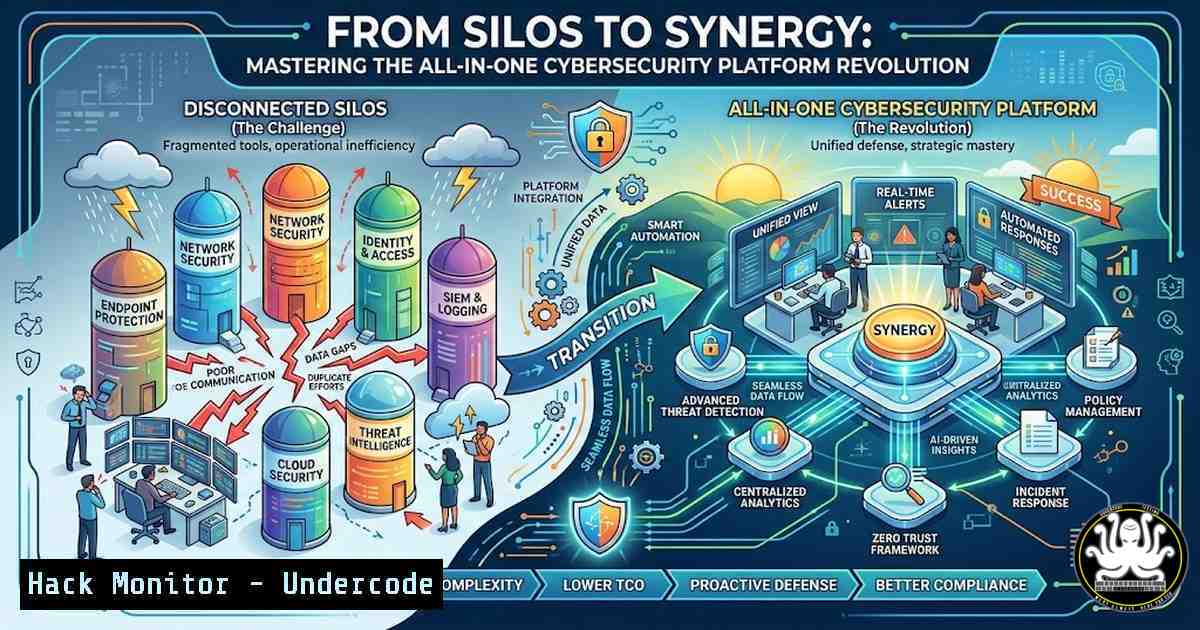
Modern enterprises are drowning in security tools. Managing 5 to 10 disparate consoles for network, endpoint, cloud, and identity protection creates visibility gaps, slows incident response, and increases administrative overhead. The industry shift toward all-in-one cybersecurity platforms—integrating Next-Gen Firewalls (NGFW), Extended Detection and Response (XDR), Security Information and Event Management (SIEM), and Zero Trust Network Access (ZTNA)—is not just a trend but a strategic necessity. This article provides a technical deep dive into deploying and validating these converged solutions, referencing the capabilities exemplified by platforms like iCyberHunt, to achieve true cyber resilience.
Learning Objectives:
- Understand the architectural components of a unified security platform and how they replace legacy tool silos.
- Learn step-by-step commands to verify and configure integrated security layers (NGFW, SIEM, XDR, ZTNA) on Linux and Windows endpoints.
- Gain practical knowledge for hardening cloud environments and industrial control systems (OT/ICS) within a unified console.
You Should Know:
- Integrating and Verifying Next-Gen Firewall (NGFW) and Intrusion Prevention Systems (IPS)
The foundation of any unified platform is the network layer. Modern NGFWs go beyond simple port blocking; they perform deep packet inspection (DPI) and use intrusion prevention systems (IPS) to stop exploits in real-time. Unlike managing a standalone firewall, an integrated platform correlates network flows with endpoint data.
Step‑by‑step guide: Verifying IPS Signatures and Traffic Inspection on Linux
After deploying the platform’s agent or connecting your network segment, you must verify that traffic is being inspected correctly.
- Simulate a malicious pattern (for testing purposes only in a lab):
Simulate a simple directory traversal attack pattern (safe example)
echo "GET /../../../etc/passwd HTTP/1.1" | nc example.com 80
- Check the platform’s central console for an alert. To verify the local agent is capturing traffic, inspect the firewall logs directly on a Linux-based NGFW appliance:
View real-time firewall logs (adjust path based on distribution, e.g., iptables/ufw or nftables)
sudo tail -f /var/log/kern.log | grep -i "iptables" OR
sudo journalctl -fu firewalld
- Windows Equivalent: Use `Get-NetFirewallRule` to view active rules, but for NGFW integration, check the agent logs in `%ProgramFiles%\iCyberHunt Agent\logs\fw_agent.log` (hypothetical path).
- Centralizing Logs and Threat Detection with Integrated SIEM
An all-in-one solution’s SIEM component collects logs from every layer. This centralization replaces the need for a separate log management tool.
Step‑by‑step guide: Forwarding and Querying Logs
Assume your unified platform uses a syslog server or a data lake.
- Linux Log Forwarding (using rsyslog): Configure your Linux servers to send authentication logs to the central SIEM.
Edit rsyslog configuration
sudo nano /etc/rsyslog.d/50-default.conf
Add the following line to forward auth logs to the SIEM collector (replace SIEM_IP)
auth. @SIEM_IP:514
Restart rsyslog
sudo systemctl restart rsyslog
- Windows Log Forwarding (using wevtutil): From an admin PowerShell, forward security events.
Create a Windows Event Collector subscription or use wevtutil to export
wevtutil epl Security C:\logs\security.evtx
For real-time forwarding, configure the agent via its GUI or push config
- Querying the SIEM: From the unified console’s search bar, you might query for failed logins across all assets:
// Example query in the platform's query language
index=main sourcetype=linux:secure "Failed password" | stats count by src_ip, user
- Implementing Zero Trust Network Access (ZTNA) for Remote Users
ZTNA replaces legacy VPNs by hiding applications from the public internet and granting access based on identity and device posture.
Step‑by‑step guide: Configuring a ZTNA Connector and Testing Access
– Deploy the Connector: You’ll typically deploy a lightweight connector in your private network (e.g., AWS VPC or on-prem).
 Example command to install a connector agent on a Linux jumpbox
sudo curl -L https://platform.icyberhunt.com/connector/install.sh | sudo bash -s -- --token=YOUR_JOIN_TOKEN
– Verify Connector Status:
sudo systemctl status icyberhunt-connector
 Check logs for successful handshake
sudo journalctl -u icyberhunt-connector -f
– Client-Side Access: On the user’s machine, they connect to the ZTNA client. To test that the network path is established, use `traceroute` or `mtr` to the application’s internal IP (as resolved by the ZTNA client).
 Linux client
mtr --report private-app.internal.company.com
 Windows client
tracert private-app.internal.company.com
4. Hardening Cloud and SaaS Configurations
Unified platforms prevent cloud misconfigurations by continuously scanning your Infrastructure as Code (IaC) and live environments against benchmarks like CIS.
Step‑by‑step guide: Remediating a Publicly Exposed S3 Bucket (AWS)
The platform’s “Cloud Security Posture Management” (CSPM) module will flag a bucket with “Public Read Access.”
- Identify the Issue: In the console, note the specific resource ID and the required remediation.
- Manual CLI Remediation (for verification): Use the AWS CLI to block public access.
Install and configure AWS CLI if not already
Check current bucket ACL
aws s3api get-bucket-acl --bucket your-bucket-name
Apply a bucket policy to block public access (example)
aws s3api put-public-access-block --bucket your-bucket-name --public-access-block-configuration BlockPublicAcls=true,IgnorePublicAcls=true,BlockPublicPolicy=true,RestrictPublicBuckets=true
- Automated Remediation: In the platform’s “Remediation” tab, you can often trigger a “Guided Remediation” or a “Runbook” that executes these CLI commands automatically via a secured service account.
5. Detecting Threats on Endpoints using XDR Capabilities
XDR unifies endpoint, network, and email data. You can hunt for threats that would be invisible in siloed tools.
Step‑by‑step guide: Hunting for a Living-off-the-Land Binary (LOLBin)
Let’s hunt for `wmic.exe` usage on Windows, a common LOLBin used for discovery.
- Query the XDR Data Lake: Use the platform’s search interface.
// Hypothetical query
ProcessEvents | where process_name == "wmic.exe" and command_line contains "process" | project hostname, user, timestamp, command_line
- Linux Endpoint Verification: If the XDR sensor is installed, you can check its local cache.
Check the local agent's process tracking logs
sudo cat /var/log/icyberhunt-agent/process_monitor.log | grep "cmdline"
- Isolate a Compromised Host: If a threat is confirmed, initiate isolation from the console. The command-level equivalent is:
Windows: The agent runs this behind the scenes
New-NetFirewallRule -DisplayName "Agent Isolation" -Direction Outbound -Action Block
New-NetFirewallRule -DisplayName "Agent Isolation Inbound" -Direction Inbound -Action Block
6. Securing OT/ICS Environments with Protocol Inspection
Protecting industrial systems requires deep understanding of protocols like Modbus, DNP3, or Siemens S7.
Step‑by‑step guide: Deploying a Passive Sensor for OT Traffic
– Deploy a Network Tap or SPAN Port: Configure a switch port to mirror traffic from the OT network to the platform’s OT sensor.
– Verify Protocol Dissection: On the sensor (often a hardened Linux appliance), you can manually inspect packets to ensure the sensor sees them.
 Install tcpdump on the OT sensor
sudo tcpdump -i eth0 -n port 502 -vv -c 10
 This captures Modbus traffic (port 502). You should see packets.
– Create an Alert for Malformed Modbus Commands: In the console, create a custom detection rule that triggers on specific function codes or out-of-bounds addresses seen in the tcpdump output.
What Undercode Say:
- Consolidation is Inevitable, but Implementation is Key: The allure of a single pane of glass is powerful, but success hinges on proper integration. Simply stacking features (NGFW, SIEM, XDR) without ensuring data correlation creates a “single pane of glass” over a messy basement. The real value, as demonstrated by platforms like iCyberHunt, lies in the automated correlation between network flows and endpoint process data to stop attacks that siloed tools miss. Organizations must invest in the engineering effort to tune these correlations, not just the procurement of the tool.
- Unified Platforms Democratize Advanced Defense: The barrier to implementing Zero Trust or comprehensive OT security is lowered when it’s a module within an existing platform rather than a multi-million dollar, standalone project. This allows small-to-medium enterprises to adopt capabilities previously reserved for large corporations. However, this also introduces a single point of failure; a compromise of the management console could be catastrophic. Therefore, hardening access to the unified console with strong MFA and privileged access workstations (PAWs) is not optional—it is the bedrock of the entire security posture.
Prediction:
The next evolution of all-in-one cybersecurity platforms will be the deep integration of Generative AI for autonomous remediation. Within the next 18-24 months, we will see platforms that not only detect a “Pass the Hash” attack via correlated XDR/SIEM data but also autonomously generate and apply a firewall rule on the NGFW to block the attacker’s C2 IP, roll back the compromised endpoint to a pre-infection state via integrated EDR, and force a password reset for the affected user via the identity module—all without human intervention. This level of orchestration will redefine the “mean time to respond” (MTTR) and shift the security operations center (SOC) focus from response to strategic threat hunting.
🎯Let’s Practice For Free:
IT/Security Reporter URL:
Reported By: Aipowereddefense Zerotrust – Hackers Feeds
Extra Hub: Undercode MoN
Basic Verification: Pass ✅


