
Listen to this Post
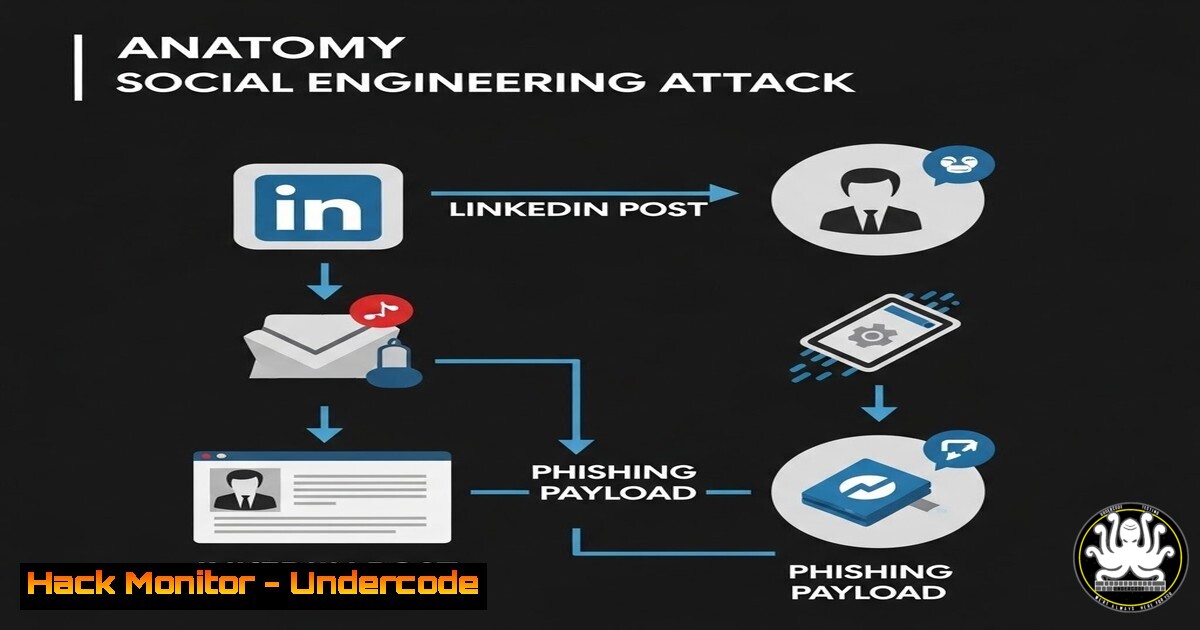
Introduction:
A seemingly innocuous LinkedIn post discussing “Amexia” and bonus points serves as a perfect case study in modern social engineering. While the original post appears to be a genuine offer of invitation links, it highlights the fine line between legitimate marketing and malicious phishing lures. In the cybersecurity landscape, attackers constantly leverage trending topics and direct messaging (DM) tactics to bypass traditional email filters and target individuals directly on professional networks. This article dissects the technical mechanics behind such attacks, providing blue teams and security professionals with the tools to analyze, detect, and respond to these evolving threats.
Learning Objectives:
- Understand the anatomy of a professional-network phishing lure and its technical indicators.
- Learn to perform manual email header analysis and URL sandboxing to verify link safety.
- Gain proficiency in using command-line tools (Linux/Windows) to extract metadata and identify malicious infrastructure.
- Identify key API security risks associated with social media integration and link-sharing services.
You Should Know:
- Analyzing the Bait: Header Analysis and Metadata Extraction
The core of this attack vector relies on the “calls to action” hidden behind shortened URLs or direct messages. The first step in a security analysis is to examine the context without directly interacting with the link. Using the content provided, we would treat any link associated with “Amexia” or “bonus points” as suspicious.
To analyze a received link (if delivered via email or message), we use header analysis to trace the origin. On a Linux system, you can use `dig` and `whois` to investigate the domain before visiting it.
Step‑by‑step guide:
- Extract the Domain: If the link is `bit.ly/xxx` or similar, use a service like `unshorten.me` or the command line to find the final destination.
- Query DNS Records: Use `dig` to find the IP address and name servers.
dig +short example-malicious-domain.com
dig +short NS example-malicious-domain.com
- Check IP Reputation: Use `whois` to see where the server is hosted. If it’s a newly registered domain or hosted in a region not aligned with the claimed company (Amex), it is a red flag.
whois 192.0.2.1 Replace with the IP from the dig command
- Windows Equivalent: On Windows PowerShell, you can use `Resolve-DnsName` and
Test-NetConnection.Resolve-DnsName example-malicious-domain.com Test-NetConnection example-malicious-domain.com -Port 443
-
Sandboxing the Payload: URL Analysis and Reverse Engineering
Never click a suspicious link on a production machine. Security professionals utilize sandbox environments to observe the behavior of the link. The goal is to see if the URL triggers a redirect chain, attempts to download a file, or presents a credential harvesting form mimicking a login portal (e.g., a fake American Express login).
Step‑by‑step guide:
- Set up a VM: Use a disposable Linux virtual machine (like a snapshotted Ubuntu instance) or a Windows Sandbox (available on Windows 10/11 Pro/Enterprise).
- Intercept Traffic: Use `tcpdump` or Wireshark on the VM to capture network traffic when visiting the URL.
sudo tcpdump -i eth0 -w capture.pcap
- Analyze with Curl: Use `curl` to view the HTTP headers and follow redirects without rendering the page.
curl -I -L http://suspicious-link.com
curl -L -v http://suspicious-link.com > downloaded_page.html
- Inspect the Code: Open the downloaded `html` file in a text editor. Look for obfuscated JavaScript, base64 encoded strings (use `echo “base64string” | base64 -d` to decode), or forms posting data to a foreign IP address.
3. Exploitation Vectors: Credential Harvesting and Session Hijacking
If the link leads to a fake login page, the attacker is performing “phishing.” The technical exploitation relies on the victim entering their credentials. Once submitted, the credentials are sent to an attacker-controlled server.
Mitigation Commands and Configuration:
- Check for SSL/TLS: Even if a site has a padlock (HTTPS), it doesn’t mean it’s safe. Attackers use free SSL certificates. Check the certificate issuer details in the browser.
- Windows Firewall Rule (Outbound): As a defender, you can block outbound connections to known malicious IPs.
New-NetFirewallRule -DisplayName "Block Malicious C2" -Direction Outbound -LocalPort Any -Protocol Any -Action Block -RemoteAddress 192.0.2.1
- Linux Iptables:
sudo iptables -A OUTPUT -d 192.0.2.1 -j DROP
4. API Security and the “Invitation Link” Mechanic
The original post mentions “kutsulinkillä” (invitation link). This is a common API-based mechanic. Attackers can automate the creation of these invites or exploit API endpoints to scrape user data.
Step‑by‑step guide:
- Recon with DevTools: Open the browser’s Developer Tools (F12) on the legitimate service’s network tab.
- Analyze Requests: Look for API calls sending or receiving data (e.g.,
GET /api/invites). - Testing for IDOR: If you receive an invite link, change the ID in the URL. If you can see someone else’s invite, the API has an Insecure Direct Object Reference (IDOR) vulnerability.
Example of testing IDOR with curl
curl -X GET https://target.com/api/invites/12345 -H "Authorization: Bearer VALID_TOKEN"
curl -X GET https://target.com/api/invites/12346 -H "Authorization: Bearer VALID_TOKEN"
5. Cloud Hardening Against Phishing Campaigns
Organizations must harden their cloud environments (Microsoft 365, Google Workspace) against credential theft originating from these social media lures.
Step‑by‑step guide (Conditional Access Policies):
- Enforce MFA: Ensure Multi-Factor Authentication is required for all users.
- Set Location-Based Policies: In Azure AD / Entra ID, create a Conditional Access policy that blocks access from countries where the business does not operate.
– Path: Azure Portal > Entra ID > Security > Conditional Access > New Policy.
– Assignments: Include all users.
– Conditions: Locations > Include any untrusted countries.
– Access Controls: Grant > Require multi-factor authentication (or Block Access).
3. Disable Legacy Authentication: Attackers use legacy protocols (POP, SMTP, IMAP) which don’t support MFA. Disable them via Conditional Access.
6. Vulnerability Exploitation: Weaponizing the Link
In a penetration testing context, a penetration tester would use a link like this to deliver a payload via a USB drop or a spear-phishing email, combined with a tool like the Social-Engineer Toolkit (SET) on Kali Linux.
Step‑by‑step guide (SET – for authorized testing only):
1. Open SET:
sudo setoolkit
2. Select Attack Vector: Select `1) Social-Engineering Attacks`.
3. Select Method: Select `2) Website Attack Vectors`.
- Select Clone: Select `3) Credential Harvester Attack Method` then
2) Site Cloner. - Input IP: Enter the IP address of your attacking machine. SET will clone the legitimate login page and capture POST requests, displaying credentials in the terminal.
What Undercode Say:
- Key Takeaway 1: The human element remains the weakest link. Even on professional networks like LinkedIn, trust is a commodity that attackers exploit. The “three links available, DM for info” tactic is a classic scarcity principle used to bypass automated scanners and engage the victim directly.
- Key Takeaway 2: Defense requires a multi-layered approach. Technical controls like email filtering and endpoint detection are crucial, but they must be paired with user education. Users must be trained to verify the identity of the sender through a secondary channel (e.g., a phone call) before clicking unsolicited links, regardless of how professional the platform appears.
- Analysis: The convergence of social media APIs and phishing introduces new blind spots for security teams. While organizations invest heavily in securing email gateways, the attack surface has shifted to DMs and public posts. Blue teams must expand their monitoring to include threat intelligence feeds that track malicious domains shared on these platforms. The “Amexia” lure, whether real or hypothetical, underscores the need for browser isolation technologies and strict access policies for corporate logins, ensuring that even if credentials are harvested, they cannot be used from untrusted devices or locations.
Prediction:
Future attacks will increasingly leverage AI-generated deepfake videos and realistic profile pictures to create fake “recruiters” or “business partners” on professional networks. These AI personas will engage in lengthy conversations before sending the malicious link, making detection significantly harder for both automated systems and human intuition. The arms race will shift from analyzing the payload itself to authenticating the identity and intent of the sender through digital watermarking and behavioral biometrics.
▶️ Related Video (82% Match):
🎯Let’s Practice For Free:
IT/Security Reporter URL:
Reported By: Villepaivinen Viimeist%C3%A4 – Hackers Feeds
Extra Hub: Undercode MoN
Basic Verification: Pass ✅


