Listen to this Post
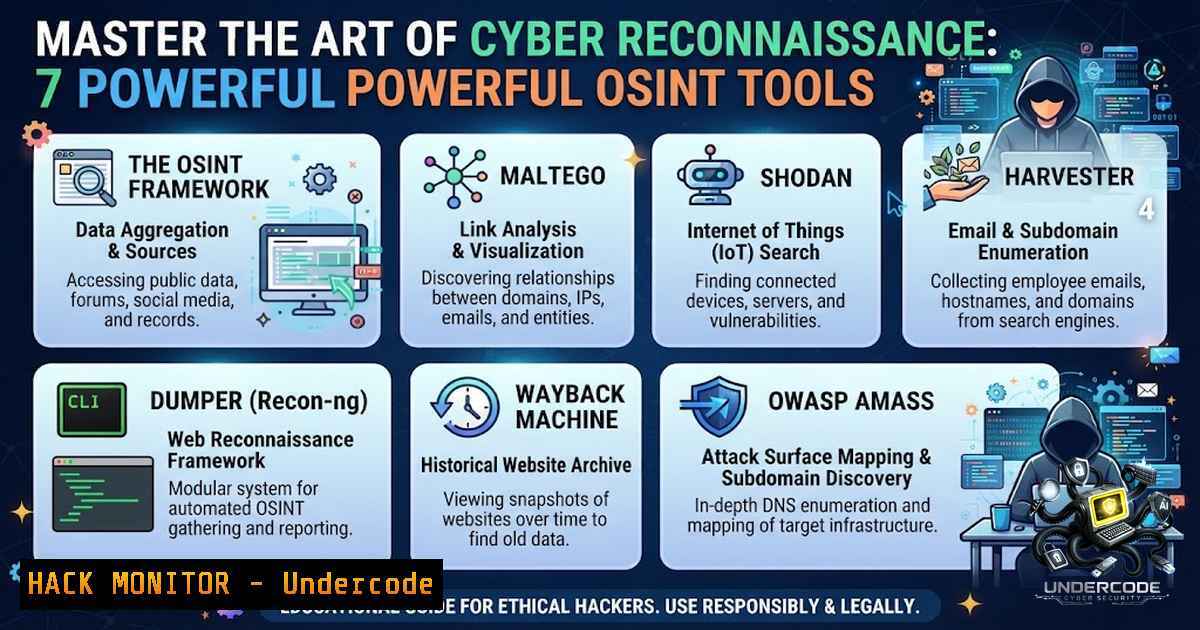
Introduction
Every successful security assessment—whether for a web application, API, network, or cloud environment—begins with a single critical phase: reconnaissance. Before launching a single exploit or running a vulnerability scanner, security professionals must first understand their target inside and out, gathering intelligence on exposed assets, technologies, and attack surfaces. This foundational step, often called “footprinting” or “information gathering,” determines the success or failure of the entire penetration testing engagement. In this comprehensive guide, we’ll explore the essential reconnaissance tools and techniques that form the backbone of modern cybersecurity assessments, from domain enumeration to OSINT automation.
Learning Objectives
- Master the core reconnaissance categories including domain enumeration, DNS analysis, OSINT gathering, and technology fingerprinting
- Learn to install, configure, and execute industry-standard tools like Amass, Subfinder, Maltego, and SpiderFoot
- Understand how to integrate passive and active reconnaissance techniques for comprehensive attack surface mapping
1. Domain & Subdomain Enumeration with OWASP Amass
Domain and subdomain enumeration is the first step in understanding an organization’s external attack surface. OWASP Amass stands as one of the most comprehensive tools in this category, combining passive data sources, active probing, and DNS brute-forcing to discover target domains and related assets.
What This Does: Amass performs deep DNS enumeration and network mapping, discovering subdomains through multiple techniques including querying data sources, certificate transparency logs, DNS brute-forcing, and zone transfers.
Installation on Linux (Kali):
 Amass is pre-installed on Kali Linux
 For other distributions, install via Go:
go install -v github.com/OWASP/Amass/v3/...@master
Basic Usage:
 Passive subdomain enumeration (no direct interaction with target)
amass enum -passive -d example.com

Active enumeration with brute-force
amass enum -brute -d example.com

Save results to output file
amass enum -passive -d example.com -o subdomains.txt
Step-by-Step Guide:
- Start with passive enumeration using the `-passive` flag to avoid detection
- Review the discovered subdomains and identify interesting targets (admin, api, dev, staging)
- Run active enumeration with `-brute` to discover subdomains not found in public sources
- Use the `-o` parameter to export results for further analysis
- Pipe results to tools like httpx to identify live hosts
2. Fast Passive Subdomain Discovery with Subfinder
While Amass offers comprehensive enumeration, Subfinder specializes in fast, passive subdomain discovery using APIs and public sources.
What This Does: Subfinder discovers valid subdomains for websites by querying passive online sources including search engines, Pastebins, and internet archives.
Installation:
 Via apt (fastest on Kali/Debian)
sudo apt update && sudo apt install subfinder -y

Via Go (latest version)
go install -v github.com/projectdiscovery/subfinder/v2/cmd/subfinder@latest
Basic Usage:
 Basic subdomain enumeration
subfinder -d example.com

Output to file
subfinder -d example.com -o subfinder_results.txt

Use specific sources
subfinder -d example.com -s shodan,censys,virustotal
Step-by-Step Guide:
- Install Subfinder using either apt or Go-based installation
- Run a basic scan with `subfinder -d target.com`
3. Filter results using `-s` to specify custom data sources - Integrate with httpx for live host verification: `subfinder -d example.com | httpx -status-code -title`
5. Combine with other ProjectDiscovery tools (nuclei, naabu) for a complete reconnaissance pipeline
3. Comprehensive DNS Reconnaissance with dnsrecon
DNS reconnaissance reveals the underlying infrastructure through record enumeration, zone transfers, and reverse lookups.
What This Does: dnsrecon performs multiple DNS enumeration techniques including zone transfers (AXFR), brute-force subdomain discovery, cache snooping, DNSSEC zone walking, and reverse lookups.
Basic Usage:
 General DNS record enumeration (MX, SOA, NS, A, AAAA, SPF, TXT)
dnsrecon -d example.com

Check for zone transfers
dnsrecon -d example.com -t axfr

Brute-force subdomains using a wordlist
dnsrecon -d example.com -D /usr/share/wordlists/dnsmap.txt -t brt

Reverse lookup for IP range
dnsrecon -r 192.168.1.0/24
Step-by-Step Guide:
- Start with basic record enumeration to understand the DNS infrastructure
- Attempt zone transfers (
-t axfr)—misconfigured DNS servers may reveal all subdomains - Use brute-force mode with a comprehensive wordlist for subdomain discovery
- Perform reverse lookups to map IP addresses back to domain names
- Document all findings including TTL values and record types for infrastructure mapping
4. Visual Intelligence Gathering with Maltego
Maltego transforms raw data into visual intelligence, mapping relationships between domains, IP addresses, email addresses, and social media profiles.
What This Does: Maltego uses “Transforms” to collect data from various sources, visualizing connections between entities to reveal hidden relationships.
Getting Started (Kali Linux):
 Maltego is pre-installed in Kali Linux
 Launch from Applications > 08-Information Gathering > maltego
Step-by-Step Guide:
1. Create a Maltego ID account for authentication
- Launch Maltego and create a new blank graph
- Install additional transforms from the Transform Hub (including Shodan, Have I Been Pwned)
- Add a starting entity (domain, email, or person name)
- Run transforms to discover connected entities (DNS names, IP addresses, email addresses, social profiles)
- Analyze the visual graph to identify attack vectors and relationships
5. Automated OSINT Intelligence with SpiderFoot
SpiderFoot automates open-source intelligence gathering, integrating with over 300 data sources to collect intelligence on targets.
What This Does: SpiderFoot automates OSINT collection by querying public data sources including DNS, WHOIS, social media, search engines, and threat intelligence feeds.
Installation:
 On Kali Linux (pre-installed)
 For other systems:
sudo apt install spiderfoot

Or via Docker
docker pull spiderfoot/spiderfoot
docker run -p 5001:5001 spiderfoot/spiderfoot
Basic Usage:
 Launch the web interface
spiderfoot -l 127.0.0.1:5001

Command-line scan
spiderfoot -s example.com -m all -o output.json
Step-by-Step Guide:
- Launch SpiderFoot with `spiderfoot -l 0.0.0.0:5001` to access the web UI
- Create a new scan and enter the target (domain, IP, email, etc.)
3. Select modules based on your reconnaissance objectives
- Run the scan and review results organized by data type
5. Export findings for reporting or further analysis
6. Internet Asset Discovery with Shodan and Censys
Shodan and Censys are search engines for internet-connected devices, revealing exposed systems, services, and vulnerabilities.
What This Does: These platforms index internet-connected devices, allowing security professionals to discover exposed assets, identify misconfigurations, and assess external attack surfaces.
Basic Shodan Queries:
 Search for specific services
shodan search "port:22 country:US"

Get host information
shodan host 8.8.8.8

Search for Apache servers
shodan search "product:Apache httpd"
Basic Censys Queries:
 Search for certificates
censys certificates search "parsed.names: example.com"

Host search
censys hosts search "services.service_name: HTTP"
Step-by-Step Guide:
- Create accounts on Shodan and Censys for API access
- Use search filters to find specific technologies (
product:"Apache",port:443) - Analyze results to identify exposed databases, outdated software, and misconfigured services
- Use the APIs for automated monitoring and bulk data processing
7. Technology Fingerprinting with Wappalyzer and WhatWeb
Technology fingerprinting reveals the software stack powering web applications, identifying frameworks, CMS platforms, and web servers.
What This Does: These tools inspect HTML code, JavaScript variables, and response headers to identify technologies used on websites.
WhatWeb Usage:
 Basic fingerprinting
whatweb example.com

Aggressive scanning (more thorough)
whatweb -a 3 example.com

Output in JSON format
whatweb -a 3 example.com -o json
Wappalyzer: Available as a browser extension or CLI tool that identifies over 1,800 technologies.
Step-by-Step Guide:
- Run WhatWeb with aggressive mode (
-a 3) for comprehensive fingerprinting
2. Identify web servers, programming languages, and frameworks
- Cross-reference identified versions with known CVEs and vulnerabilities
- Use Wappalyzer browser extension for quick on-the-fly analysis
- Document the technology stack for vulnerability assessment planning
What Undercode Say
- Reconnaissance isn’t attacking—it’s understanding. Better visibility leads to more focused testing and stronger security assessments. The goal is to map the attack surface comprehensively before any active testing begins.
-
Start passive, then go active. Always begin with passive reconnaissance (OSINT, public source queries) to avoid detection. Active probing should only occur after passive intelligence has been collected and analyzed.
-
Continuous reconnaissance is the new standard. Attack surfaces change daily—continuous automated recon ensures findings reflect today’s exposure, dramatically reducing wasted effort and improving decision-making.
-
Tools are only as good as the operator. Understanding what each tool does, its limitations, and how to interpret results is more important than simply running commands. Master the methodology, not just the tools.
-
OPSEC matters. Stealth should always take priority over speed when conducting reconnaissance. Prefer techniques marked as quiet or passive to avoid triggering security controls.
Prediction
-
+1 AI-powered reconnaissance automation will become standard within 24 months, with tools capable of correlating OSINT data to predict vulnerabilities before they’re discovered. This will dramatically accelerate both offensive and defensive security operations.
-
+1 The democratization of reconnaissance tools will lower barriers to entry for security professionals, enabling smaller teams to conduct enterprise-grade attack surface mapping without massive budgets.
-
-1 Threat actors are increasingly leveraging AI for sophisticated reconnaissance, making automated threat detection and response essential for defense. Organizations must adopt continuous monitoring to keep pace.
-
-1 The growing volume of exposed internet-facing assets will outpace manual reconnaissance capabilities, leading to more undetected breaches from overlooked attack surfaces.
-
+1 Integration of reconnaissance findings with MITRE ATT&CK frameworks will enable more precise threat modeling and proactive defense strategies.
▶️ Related Video (78% Match):
https://www.youtube.com/watch?v=5une30fIDww
🎯Let’s Practice For Free:
🎓 Live Courses & Certifications:
Join Undercode Academy for Verified Certifications
🚀 Request a Custom Project:
Secure, high-velocity infrastructure and disruptive technological engineering. Contact our engineering team for high-tier development and proprietary systems:
[email protected]
💎 Smart Architecture | 🛡️ Secure by Design | ⭐ Trusted by Thousands
IT/Security Reporter URL:
Reported By: Sandeepkumar9004 Cybersecurity – Hackers Feeds
Extra Hub: Undercode MoN
Basic Verification: Pass ✅


