Listen to this Post
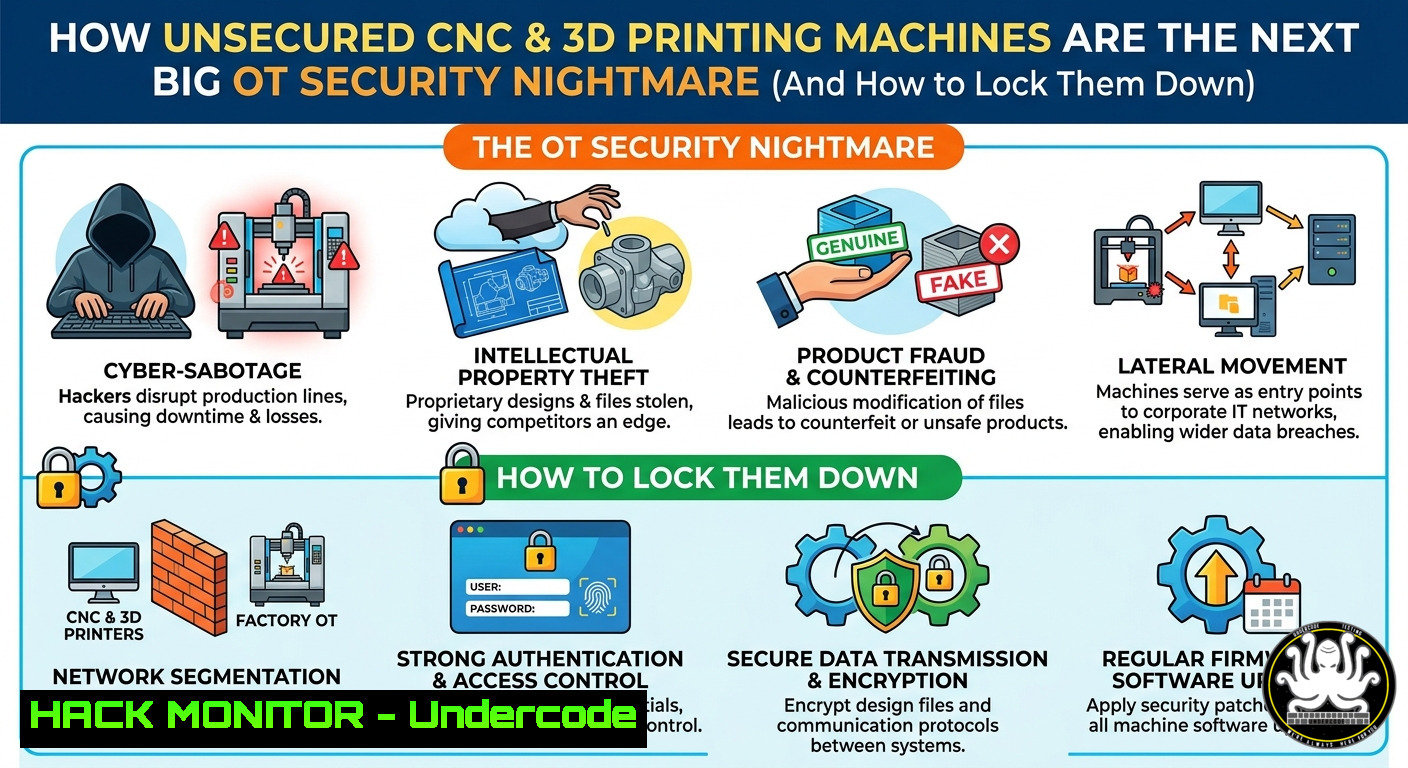
Introduction:
The rise of digital fabrication tools—from XPS hot wire cutters to CNC routers and 3D printers—has unlocked endless creative and industrial possibilities. However, as these devices become increasingly networked and cloud-connected, they introduce severe operational technology (OT) security risks that most makers, workshops, and factories ignore. Attackers can exploit default credentials, unpatched firmware, or exposed APIs to steal intellectual property (G‑code, STL files), sabotage production, or pivot into corporate IT networks.
Learning Objectives:
- Identify common attack surfaces in industrial CNC, robotic, and additive manufacturing environments
- Apply network segmentation, access controls, and hardening commands for Linux/Windows-based controller workstations
- Implement file integrity monitoring and incident response steps to detect and mitigate G‑code tampering or unauthorized remote commands
You Should Know:
- Assess Your CNC’s Cyber Footprint – Find Open Ports & Default Services
Most CNC controllers (e.g., LinuxCNC, Mach4, or proprietary embedded systems) run unencrypted services like VNC, Telnet, HTTP, or Modbus on well-known ports. Attackers scan for these using Shodan or Nmap. Follow this step‑by‑step guide to audit your machine’s exposure.
Step‑by‑step:
- On the same network as the CNC, run an Nmap scan to discover live hosts and open ports:
nmap -sn 192.168.1.0/24  Discover devices
nmap -sV -p- --open 192.168.1.100  Deep scan on found IP (replace with your CNC IP)
- For Windows‑based controllers, use PowerShell to check listening ports:
Get-NetTCPConnection | Where-Object {$_.State -eq 'Listen'} | Format-Table LocalPort, OwningProcess netstat -an | findstr LISTENING - For Linux controllers, check active services:
ss -tuln
sudo lsof -i -P -n | grep LISTEN
- If you find default services like `telnet` (port 23) or `http` (80/8080) with no authentication, immediately disable them. For example, stop and mask Telnet on Linux:
sudo systemctl stop telnet.socket
sudo systemctl disable telnet.socket
2. Harden the Controller Workstation (Windows & Linux)
The PC or embedded computer that runs your CNC software is often a weak link – running outdated OS, no antivirus, and shared credentials. Use these commands to enforce basic hygiene.
Step‑by‑step (Windows):
- Disable unnecessary services (e.g., print spooler, remote registry):
Set-Service -Name Spooler -StartupType Disabled -Status Stopped
Set-Service -Name RemoteRegistry -StartupType Disabled -Status Stopped
- Configure Windows Defender Firewall to block all inbound except essential CNC traffic (e.g., port 502 for Modbus):
New-NetFirewallRule -DisplayName "Block all inbound except CNC" -Direction Inbound -Action Block
New-NetFirewallRule -DisplayName "Allow Modbus" -Direction Inbound -LocalPort 502 -Protocol TCP -Action Allow
- Enforce AppLocker to prevent unauthorised G‑code senders:
Create default rules (run as Admin)
New-AppLockerPolicy -RuleType Exe -User Everyone -Action Allow -Path "%ProgramFiles%\"
Set-AppLockerPolicy -PolicyXmlFile C:\AppLocker.xml
Step‑by‑step (Linux):
- Use UFW to allow only SSH (for management) and the CNC’s control port:
sudo ufw default deny incoming
sudo ufw default allow outgoing
sudo ufw allow 22/tcp comment 'SSH for admin'
sudo ufw allow 502/tcp comment 'Modbus if needed'
sudo ufw enable
- Remove or disable default users (e.g., `pi` on Raspberry Pi controllers):
sudo passwd -l pi
sudo userdel -r pi
sudo adduser cncadmin
sudo usermod -aG sudo cncadmin
- Secure Network Communication for OT Protocols (Modbus, MTConnect, etc.)
Most industrial CNC communications are plaintext, making them vulnerable to interception and replay attacks. Encapsulate traffic inside a VPN or SSH tunnel.
Step‑by‑step (SSH reverse tunnel for remote monitoring):
- On the CNC controller (Linux), create an outbound SSH tunnel to a jump host in your DMZ:
ssh -fN -R 9000:localhost:502 [email protected]
- On the jump host, forward local connections to the tunnel:
Allow local monitoring station to connect to port 9000, which forwards to CNC's Modbus
socat TCP-LISTEN:9000,fork TCP:localhost:9000
- For Windows CNC controllers, use `plink` (PuTTY command-line):
plink.exe -ssh -R 9000:localhost:502 user@jump-host -N
- To verify the tunnel is active, run on the jump host:
netstat -tuln | grep 9000
- Implement File Integrity Monitoring for G‑code / STL / Design Files
Attackers often modify G‑code to cause physical damage (e.g., over‑travel, spindle overspeed) or to steal proprietary toolpaths. Use file hashing to detect tampering.
Step‑by‑step (Linux with AIDE):
- Install AIDE and initialise a database of all CNC file directories:
sudo apt install aide -y
sudo aideinit
sudo mv /var/lib/aide/aide.db.new /var/lib/aide/aide.db
- Configure AIDE to watch `/home/cncuser/gcode/` and
/var/lib/cnc/jobs/. Edit/etc/aide/aide.conf:/home/cncuser/gcode/ NORMAL /var/lib/cnc/jobs/ NORMAL
- Run a daily check with cron and alert on changes:
sudo aide --check | mail -s "CNC Integrity Alert" [email protected]
Step‑by‑step (Windows PowerShell):
- Create a script to compute SHA256 hashes of all
.nc,.gcode, `.stl` files and compare to a baseline:$path = "C:\CNC_Jobs" $baselineFile = "C:\baseline.csv" First run: create baseline Get-ChildItem -Path $path -Recurse -Include .nc,.gcode | Get-FileHash | Export-Csv $baselineFile -NoTypeInformation Integrity check $current = Get-ChildItem -Path $path -Recurse -Include .nc,.gcode | Get-FileHash $baseline = Import-Csv $baselineFile Compare-Object -ReferenceObject $baseline -DifferenceObject $current -Property Hash,Path | Where-Object {$<em>.SideIndicator -eq "=>"} | ForEach-Object { Write-Warning "Modified file: $($</em>.Path)" }
5. Cloud and API Security for Remote Manufacturing
Many modern 3D printers and CNCs expose REST APIs (e.g., OctoPrint, Duet3D, or proprietary cloud slicers). Misconfigured API keys or lack of rate limiting allows attackers to cancel jobs, extrude filament, or overheat nozzles.
Step‑by‑step to secure API endpoints:
- Enumerate exposed API endpoints on your controller (replace `http://cnc-ip:5000` with your actual URL):
curl -X GET http://cnc-ip:5000/api/version
curl -X GET http://cnc-ip:5000/api/job
- If no API key is required, enforce one. For OctoPrint, edit
config.yaml:api: key: "YourSuperLongRandomKeyHere" allowCrossOrigin: false
- Restart the service and test authentication:
curl -H "X-Api-Key: YourSuperLongRandomKeyHere" http://cnc-ip:5000/api/job
- Implement rate limiting using a reverse proxy (nginx example):
location /api/ {
limit_req zone=apizone burst=5 nodelay;
proxy_pass http://cnc-ip:5000;
}
- Simulate a Vulnerability Exploitation (Educational – Do Not Run on Production)
Understanding the impact of a misconfigured CNC helps justify security investments. The following example sends a malicious G‑code command to an unauthenticated HTTP endpoint (e.g., a cheap GRBL-based controller with a web interface).
Step‑by‑step (in a lab environment):
- Identify an unprotected HTTP endpoint that accepts G‑code (e.g., `http://cnc-ip/command?cmd=G91G1X100`).
- Send a dangerous command that drives the spindle into the bed:
curl -X POST "http://cnc-ip/command?cmd=G91G1Z-50F100"
- For a printer, send a thermal runaway command (if the firmware doesn’t validate):
curl -X POST "http://printer-ip/api/printer?command=M104 S300"
- Mitigation: Require authentication on every API call, sanitise input to allow only safe G‑code (e.g., no `M104` or `G28` if not authorised), and implement a software end‑stop override check.
- Incident Response for OT Environments – Isolate, Preserve, Restore
If you suspect a CNC has been compromised (e.g., unexpected movements, altered toolpaths), follow this playbook.
Step‑by‑step:
- Immediately cut network access: on Linux CNC, block all traffic except to the management interface:
sudo iptables -A INPUT -j DROP
sudo iptables -A OUTPUT -j DROP
sudo iptables -I INPUT -s 192.168.1.0/24 -p tcp --dport 22 -j ACCEPT
- On Windows, use `netsh advfirewall` to block all inbound:
netsh advfirewall set allprofiles firewallpolicy blockinbound,allowoutbound
- Preserve volatile data (process list, network connections) before shutdown:
ps auxfw > /tmp/cnc_ps.txt
netstat -tunap > /tmp/cnc_net.txt
- Shut down the controller and boot from a known‑good golden image (stored offline). For Linux, restore with
dd:dd if=/usb/golden_image.img of=/dev/sda bs=4M status=progress
- Analyse the compromised system offline using a forensics tool like `Autopsy` or
The Sleuth Kit. Look for unauthorised G‑code files or unexpected cron jobs.
What Undercode Say:
- Convergence is inevitable, but security is optional at your peril – As CNC and 3D printers adopt IoT stacks, they inherit the same risks as traditional IT, often without any built‑in security.
- Physical damage is the new data breach – A ransomware gang that deletes G‑code is annoying; one that overwrites feed rates to crash a spindle causes real financial and safety harm.
- Start with basics – 80% of OT compromises use default passwords, unpatched services, or exposed management ports. Run an Nmap scan today on your shop floor.
Prediction:
Within 24 months, we will see the first major ransomware campaign specifically targeting additive manufacturing and CNC workspaces – not by encrypting files, but by subtly altering G‑code to ruin production batches. Security frameworks like IEC 62443 will expand to include desktop fabrication tools, and cyber‑insurance policies will require proof of file integrity monitoring and API authentication on every connected mill, lathe, and printer. Makers who ignore OT security will become the weakest link in their supply chain.
▶️ Related Video (68% Match):
🎯Let’s Practice For Free:
IT/Security Reporter URL:
Reported By: Biomeryilmaz Robotics – Hackers Feeds
Extra Hub: Undercode MoN
Basic Verification: Pass ✅


